
Radica360: document management, correspondence and PQRSD for public entities
Radica360 records everything that comes into, leaves or moves inside a public entity, routes it to the department that must answer, and tracks the response deadline in business days. Citizens file their requests online and check the status with a filing number and a code.
Developed by ITP 360 LLC
What Radica360 is
One system for the front desk, correspondence and citizen requests
Radica360 is built for Colombian public entities, where every document is "radicado": it gets a filing number, consecutive per book and per year with no gaps (R for incoming, I for internal, S for outgoing). From then on the system records who holds it, what was done with it and when it is due.
PQRSD is the Colombian term for petitions, complaints, claims, suggestions and reports from citizens. Staff work them from an inbox with a traffic-light status, department heads see what is pending and how on time their teams are, and citizens follow their request online. The product interface is in Spanish.
Modules
What Radica360 does
Features available in the product today.
Incoming filing
The front desk records the sender, channel, request type and subtype, department and retention classification. Drafts are kept in a pending list, a PDF preview is available, and a label with a QR code is printed.
Response workflow
Assign, reassign, transfer to another department, transfer to another entity, return, suspend and resume deadlines, draft the response, send it for review and for signature, respond or close.
Signed responses
The signer confirms with their password. The response is issued as a PDF with a verification code, and the system stores the SHA-256 hash of the file sent so it can be checked later on the portal.
Outgoing correspondence
Individual letters or bulk sends to a distribution list. Each one produces the letter as a PDF and is emailed to every recipient. It can be linked as the response to an incoming filing.
Internal correspondence
Memos between departments with their own number sequence, review before filing, a work inbox, search and reassignment.
Physical delivery
The courier records each paper delivery and the recipient confirms with a five-digit PIN. After five wrong attempts the PIN locks for ten minutes.
Voiding
A user asks to void one of their own filings and an approver decides. If approved, a voiding certificate is issued as a PDF with a QR code, and the number stays in the sequence.
Search and exports
Search by number, filing and response dates, sender, ID number, status, department, user and outgoing number, with export to Excel and PDF.
Indicators
On-time response rate, on-time and late responses, transfers to other entities, and filings by channel, type and department, per year and quarter, with Excel export.
Department view and clearance
Each department head sees what is pending. A clearance certificate for a departing employee is issued only when they have nothing pending, and it can be verified by its code.
Confidentiality and audit trail
A confidential filing is visible only to the assignee, the department head and the person who filed it. Every status change is recorded on the filing and attachment downloads are logged.
Administration
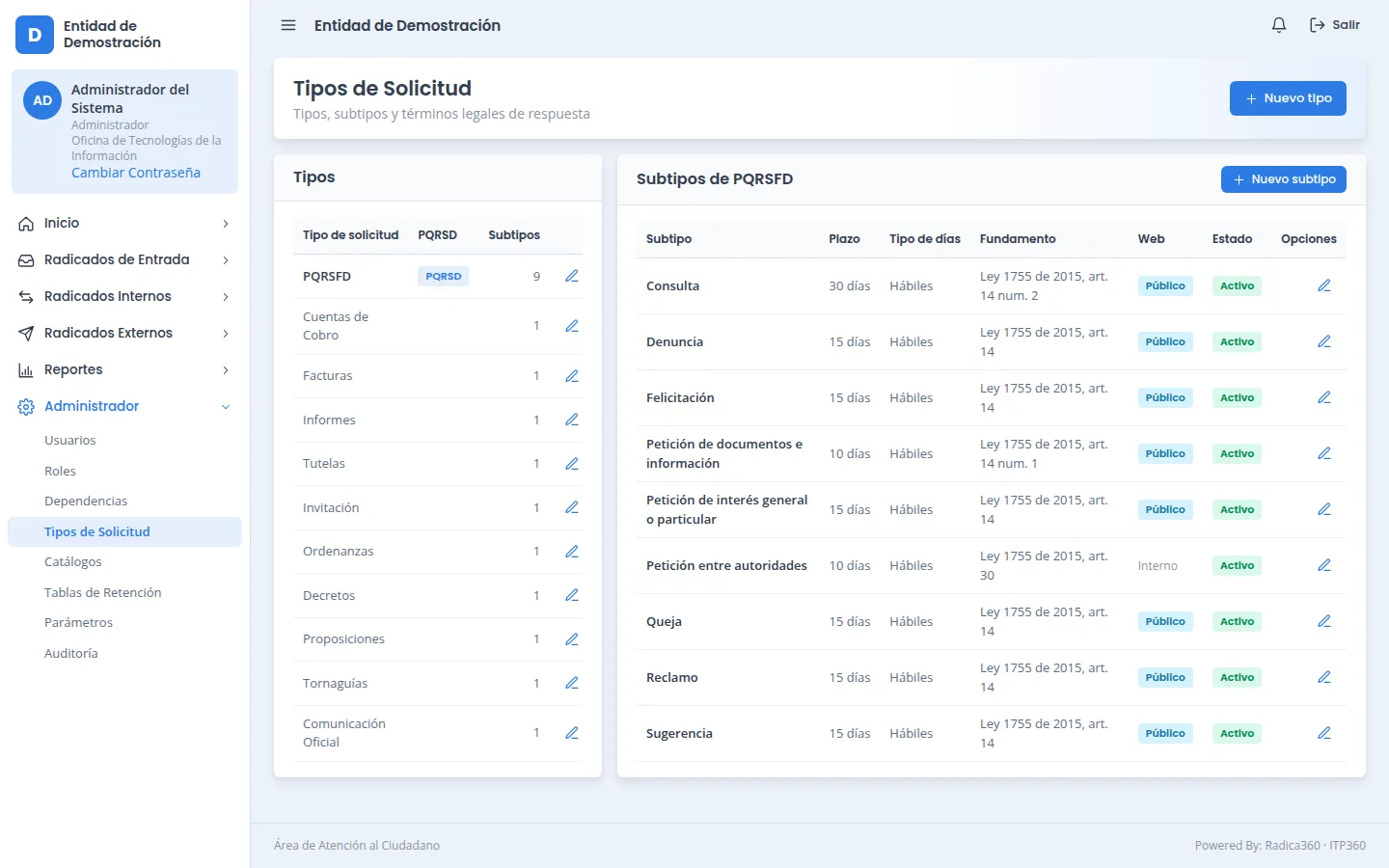
Users, roles with a permission tree, departments, request types and subtypes with their deadlines, catalogs, parameters, non-working days and an exportable audit log.
Response deadlines
Deadlines in business days and a traffic light per filing
The deadline calculation is designed for the response terms of Colombian Law 1755 of 2015. Each request subtype has its own term and legal basis, and the entity adjusts them in the admin screens.
- The term starts counting the day after filing.
- The calendar skips Saturdays, Sundays, Colombian national holidays (including the Monday moves under the Emiliani law) and any non-working days the entity enters.
- Each subtype counts in business days or calendar days.
- Suspending a term stops the clock, and resuming moves the due date by the days suspended.
- The status turns yellow when 30% of the term is left (configurable) and red when the term has passed.
Citizen portal
Filing and tracking requests online
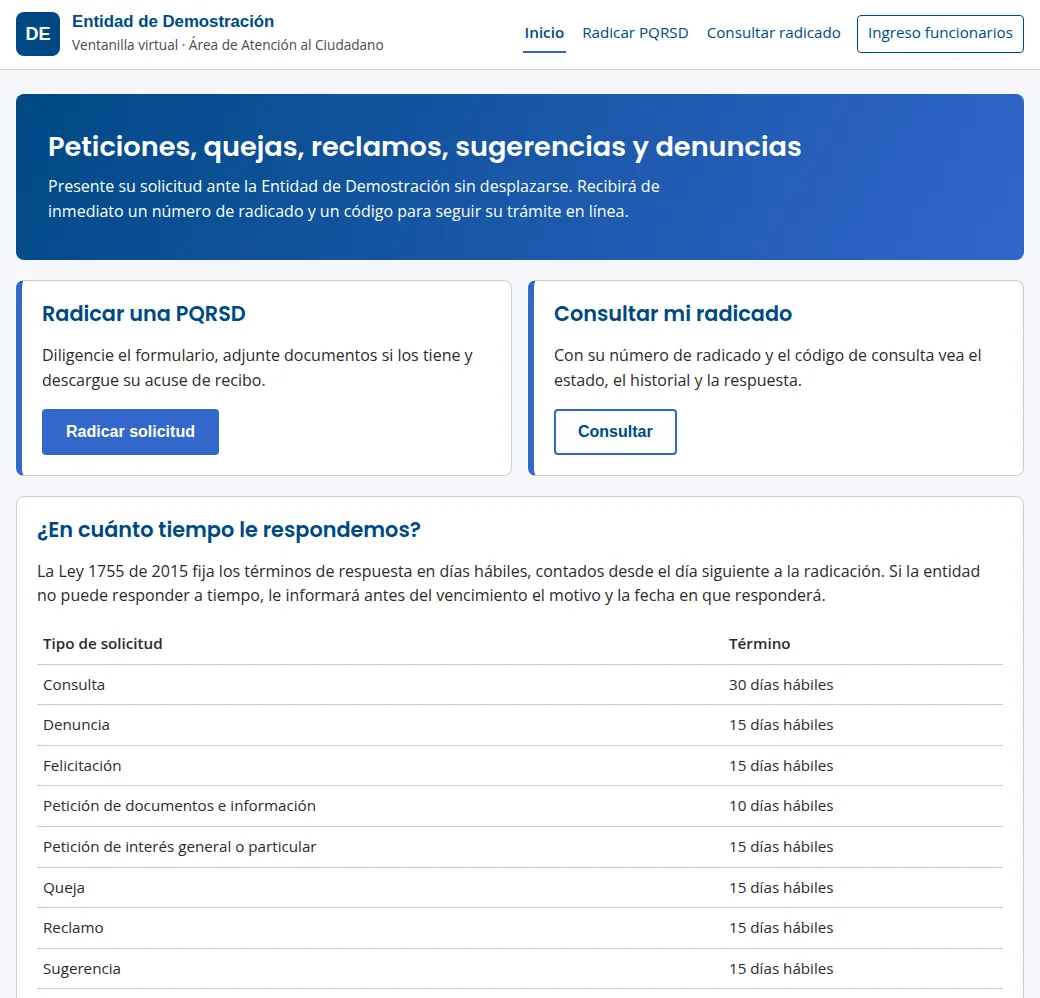
The entity’s public portal runs in the browser. Citizens do not need an account.
- Form for petitions, complaints, claims, suggestions and reports, with attachments.
- Complaints and reports can be filed anonymously.
- On filing, the citizen gets the filing number, a tracking code and a PDF receipt. If they give an email address, the receipt is emailed too.
- With the number and code they see the status and history and download the response.
- Anyone can verify a signed response, a voiding certificate or a clearance certificate on the portal from its code.
Records
Records retention schedules (TRD)
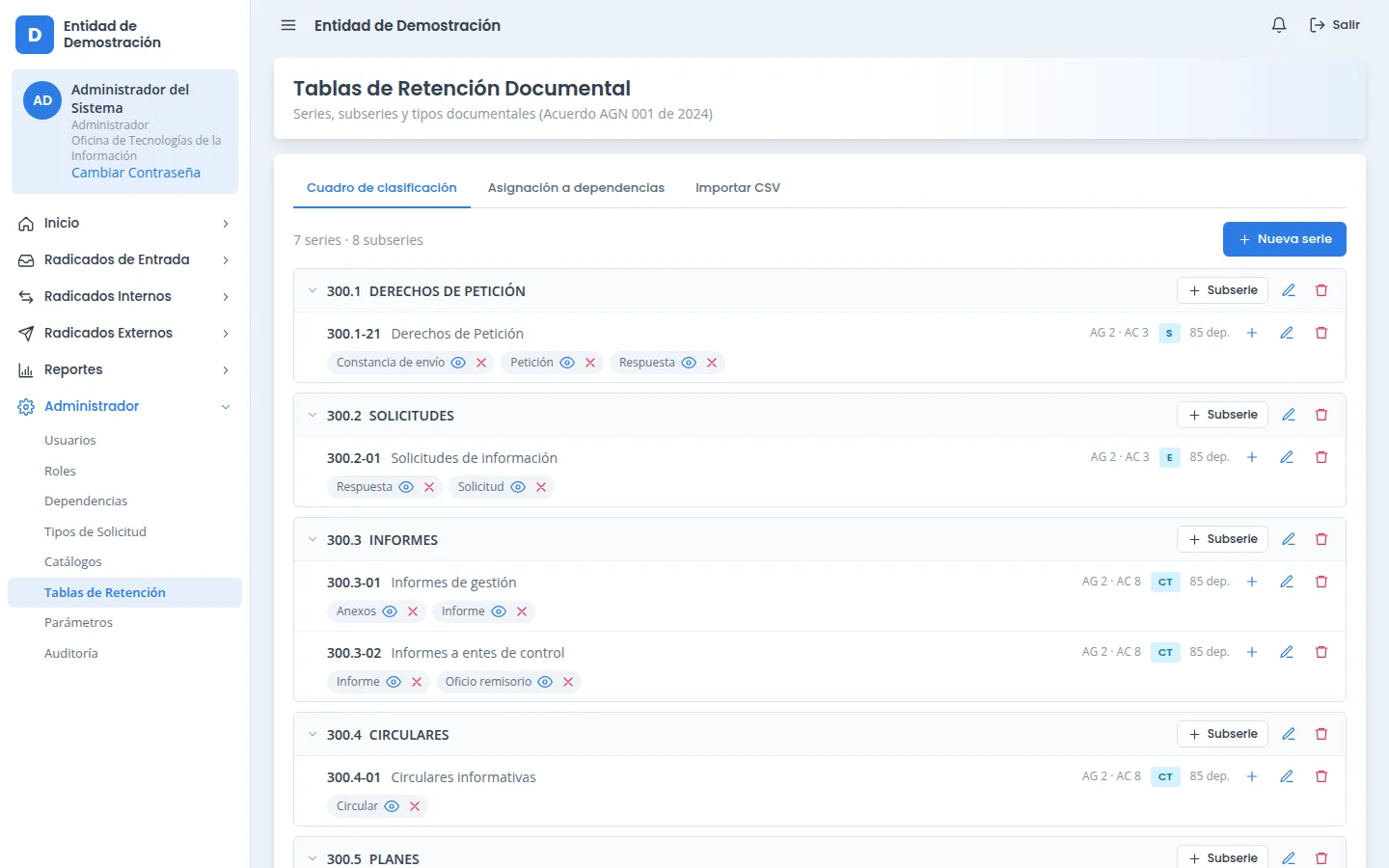
Radica360 is designed to classify every filing under the entity’s records retention schedules (Tablas de Retención Documental).
- Classification chart with series, subseries and document types, with retention time in the office and central archive and the final disposition.
- Series and subseries assigned to each department.
- Import from a CSV file with a downloadable template.
- When filing, the user picks series, subseries and document type from those assigned to the department.
Oversight
Document management indicators
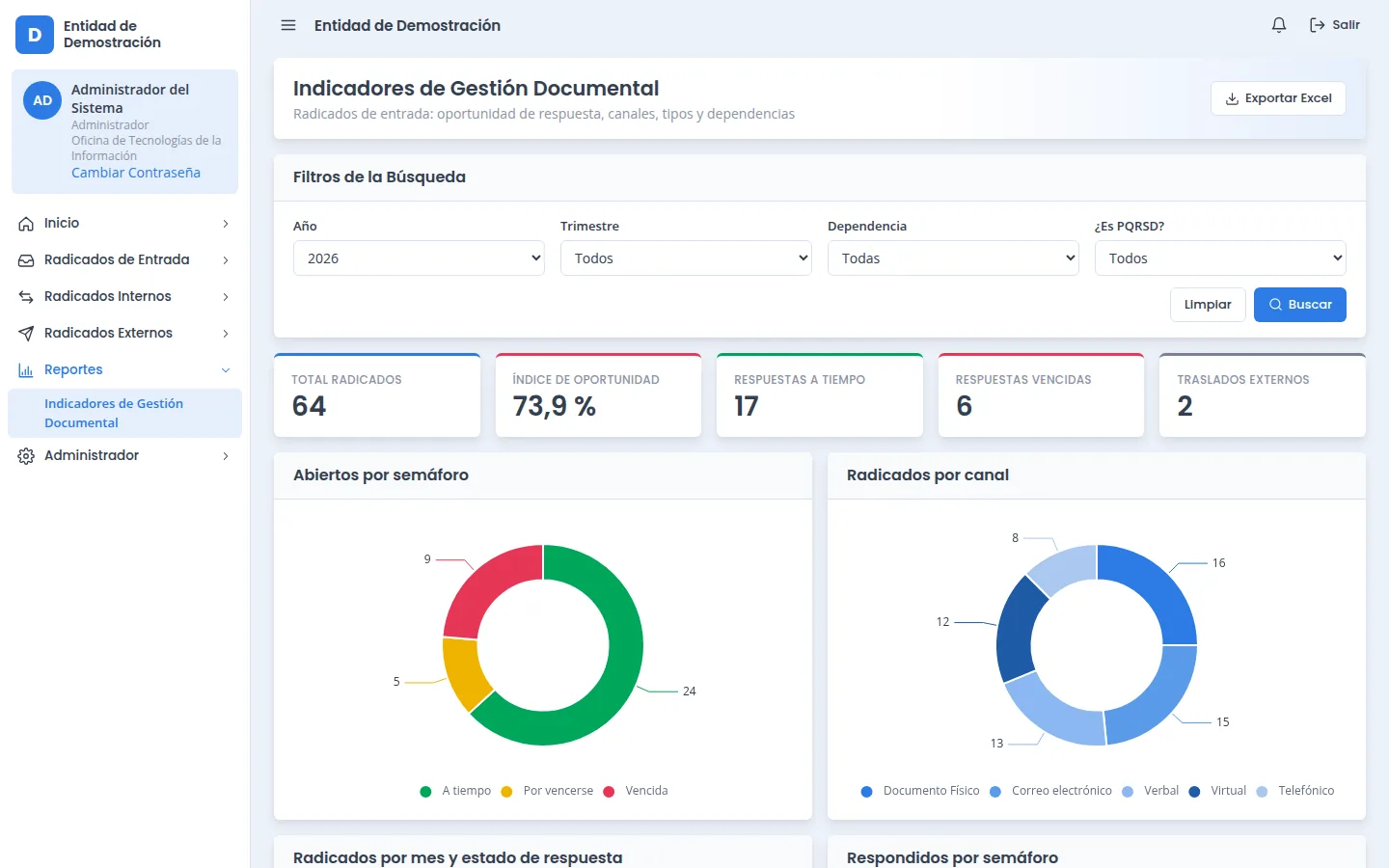
Department heads and management see how the entity is responding without building reports by hand.
- Total filings, on-time rate (on-time responses over responses given), late responses and transfers to other entities.
- Charts of open filings by traffic light, filings by channel, by month and response status, by type, by subtype and by department.
- Filters by year, quarter, department and PQRSD, with Excel export.
How a filing moves
From the front desk to the response
Filing
The front desk, the portal or a staff member records the document. The system assigns the number, computes the due date and issues the label or receipt.
Delivery
The filing lands in the department’s inbox and the paper original is delivered with PIN confirmation.
Processing
The assignee drafts the response and sends it for review and signature, or transfers the filing if it belongs elsewhere.
Response
The signed response goes out as an outgoing filing, is emailed to the citizen and is available on the portal.
Deployment
How it is installed and configured
One installation per entity
Each entity has its own installation and its own database. No data is shared between entities.
Configured per entity
Entity name, numbering prefixes, departments, catalogs, retention schedules, request types and terms are set in the installation and in the admin screens.
Web application
Staff and citizens use a web browser, with nothing to install. The interface is in Spanish, with dd/mm/yyyy dates in Colombia time.
Who builds it
Radica360 is a product of ITP 360 LLC, a technology company based in Miami, Florida. ITP 360 LLC designs, develops and maintains the software.
Request a Radica360 demo
We walk you through the system with test data and review how it would be set up for your entity.